 主界面:左侧资源管理与球体区,中部三块绘图区,右侧终端与事件列表。
软件概览
SeisY 是一个综合性的地震、月震与行星地震数据处理和模拟分析平台。
基础数据工作
支持 8 种数据格式导入(MiniSEED、SAC、SEG-Y、SEG2、ASCII、TXT、CSV 及自动检测),工作目录浏览、项目保存与载入、文件树管理、日志显示和内置命令终端。
波形与频谱处理
支持去均值、去趋势、去响应、10 种插值方法、6 种加窗函数、带通 / 中值滤波、归一化、去脉冲、频谱分析、滑动相关及多事件对比等 20 余种处理操作。
行星地震工具链
集成震源定位器、行星台站地图、射线追踪工作台、简正模工作台、模型设计器、月震工作流、PDDM 去噪、噪声提取器和 Apollo 月震系统。
主界面布局
当布局为默认时,主界面分为左侧资源管理区、左下地图区 / 球体区、中间三块绘图区和右侧伪终端与事件列表。
如果需要,用户可以通过调整窗口大小来改变布局。双击空白区域 可以恢复默认布局。
左侧资源管理区
- 浏览工作目录与文件树
- 支持排序、右键菜单和多选
- 用于导入数据、打开脚本与配置文件
- 下方连接球体区 / 地图区
左下地图区 / 球体区
- 基于 OpenGL 的天体可视化区域
- 支持地球、月球、火星等球体显示
- 可与台站、震源、路径和贴图显示联动
- 适合行星地震几何关系的直观展示
中间三块绘图区
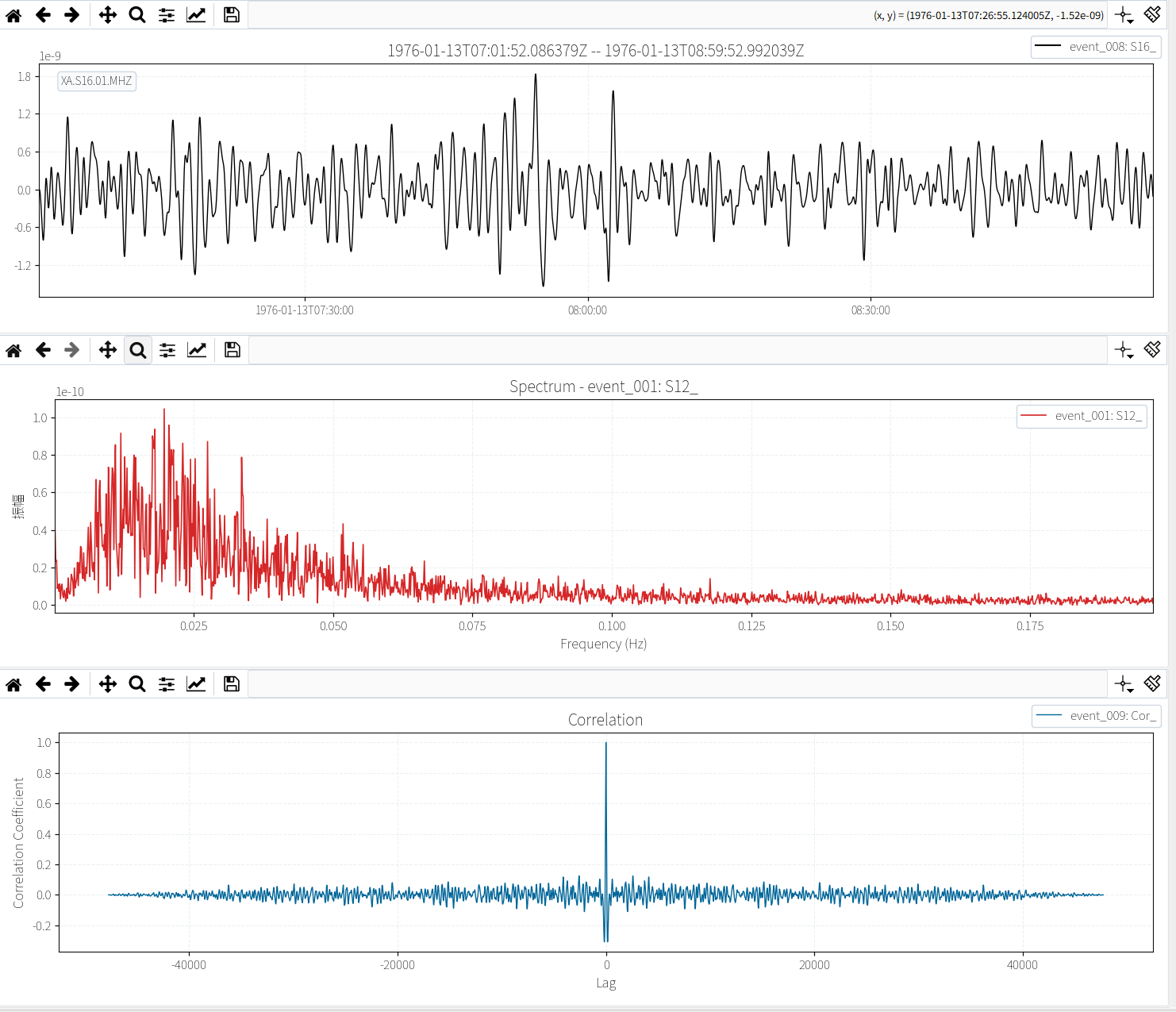
canvas_topcanvas_midcanvas_bottom- 用于波形、频谱、多事件对比及处理前后展示
右侧终端与事件列表
- 右上:日志与内置命令终端
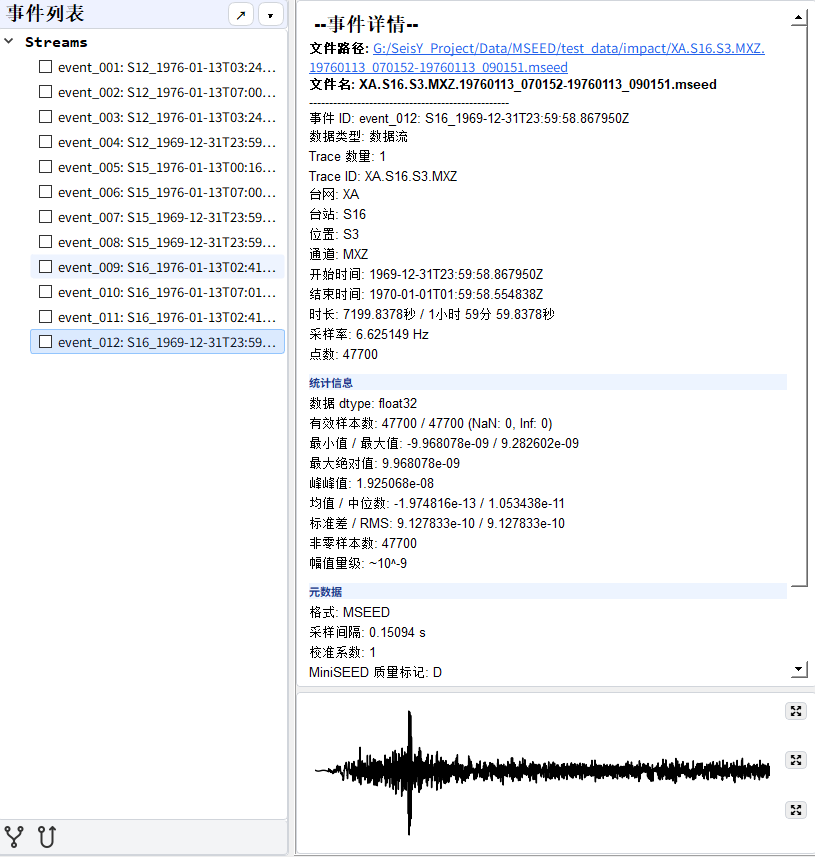
- 右下左:事件列表
- 右下右:事件详情与附加显示区域
- 底部状态栏显示路径、已选数、事件数和版本
绘图区示意
事件列表区域示意
工具栏
工具栏负责把高频操作直接放到主窗口顶部,减少菜单层级切换。主工具栏位于窗口顶部,底部工具栏位于事件列表区域。
主工具栏(5 组,共 38 个按钮 + 主题 / 语言切换)
第一组 · 文件
- 导入:导入波形数据文件
- 打开:用编辑器打开文件
- 打开文件夹:浏览工作目录(Ctrl+K)
- 保存:保存当前数据(Ctrl+S)
第二组 · 编辑
- 撤销 / 重做:操作历史回退(Ctrl+Z / Ctrl+Y)
- 查找:搜索功能(Ctrl+F)
- 视图:切换显示模式与布局
- 全屏:全屏模式切换(F11)
- 日志:显示运行日志
第三组 · 处理
- Apollo 缺失值插值:对 Apollo 数据执行缺失值插值
- 滤波:带通 / 低通滤波
- 去脉冲:异常脉冲去除与绘图
- 去均值:去除直流偏移
- 样条去趋势:样条基线去除
- 绘制频谱:绘制振幅谱
- 绘制时域与振幅谱:时域 + 频域联合显示
- 导出频谱:将频谱数据导出为文件
- 数据查看器:查看波形道头段与详细信息
- 数据全览:事件数据多维度总览
- ATT 定时校正:绝对定时(ATT)走时校正
第四组 · 数据
- 修改配置:编辑软件参数配置
- 下载地震数据:通过 FDSN 协议下载波形
- 道显示过滤:设置波形道显示过滤条件
- STA/LTA:经典 STA/LTA 震相拾取器
第五组 · 工具
- AI 助手:科研 AI 对话助手
- SeisRT:在线实时地震工具
- Apollo 系统:Apollo 月震数据管理
- 震源定位器:震源反演定位窗口
- 行星台站地图:台站与震源可视化管理
- 射线追踪:射线路径与走时分析
- 月震工作流:月震反演多步骤流程
- 仪器响应管理器:响应下载与去响应
- 简正模工作台:自由振荡与简正模分析
- 噪声提取器:自动地震噪声提取(Ctrl+N)
底部工具栏(事件列表区域)
事件相关性分析
- 互相关:两个事件之间的互相关计算
- 自相关:单个事件的自相关计算
专业工具矩阵
把“工具”和“模拟”中的核心模块集中呈现,便于快速理解 SeisY 的能力范围。
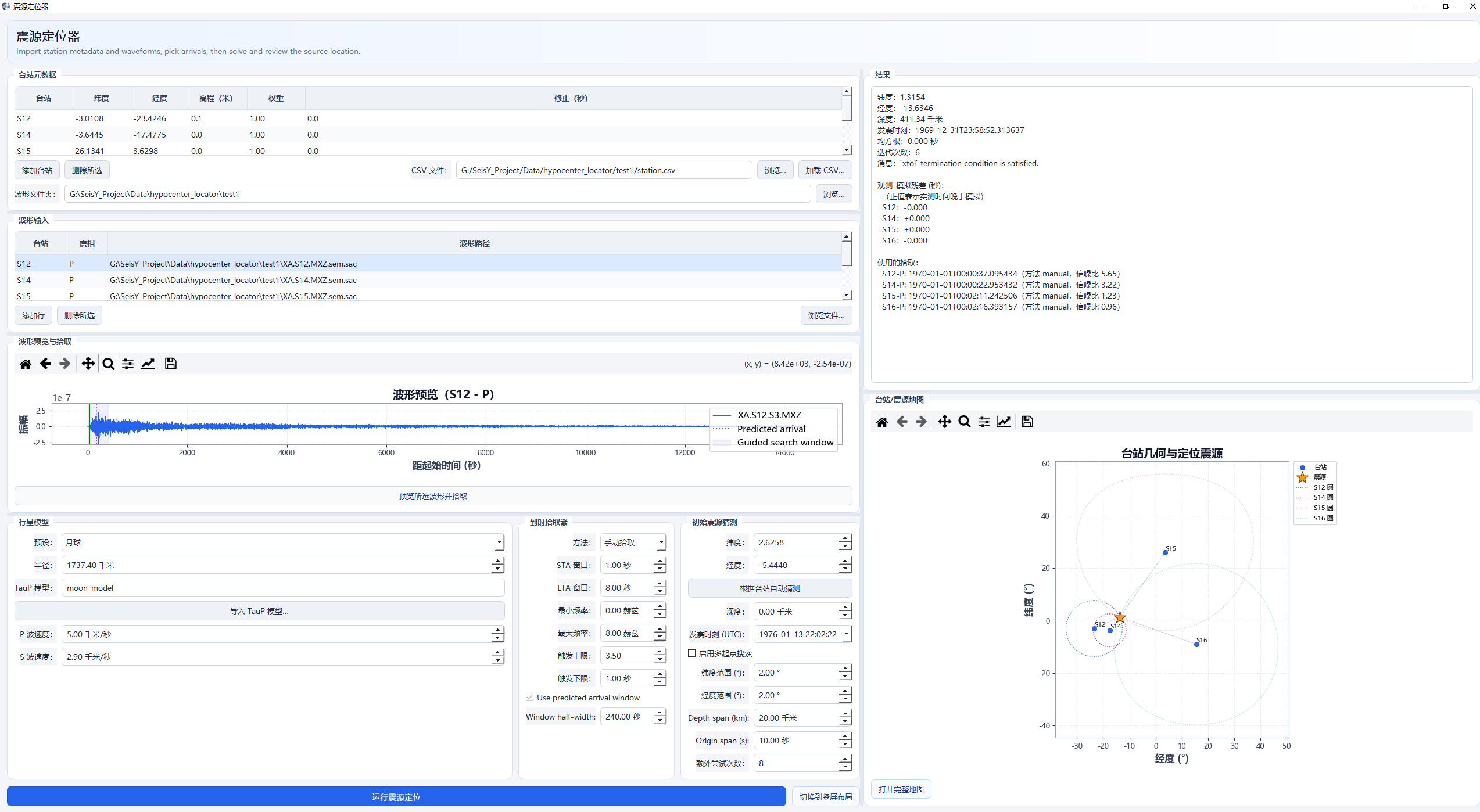
震源定位器
台站、波形、拾取、模型、结果与地图一体化定位窗口。
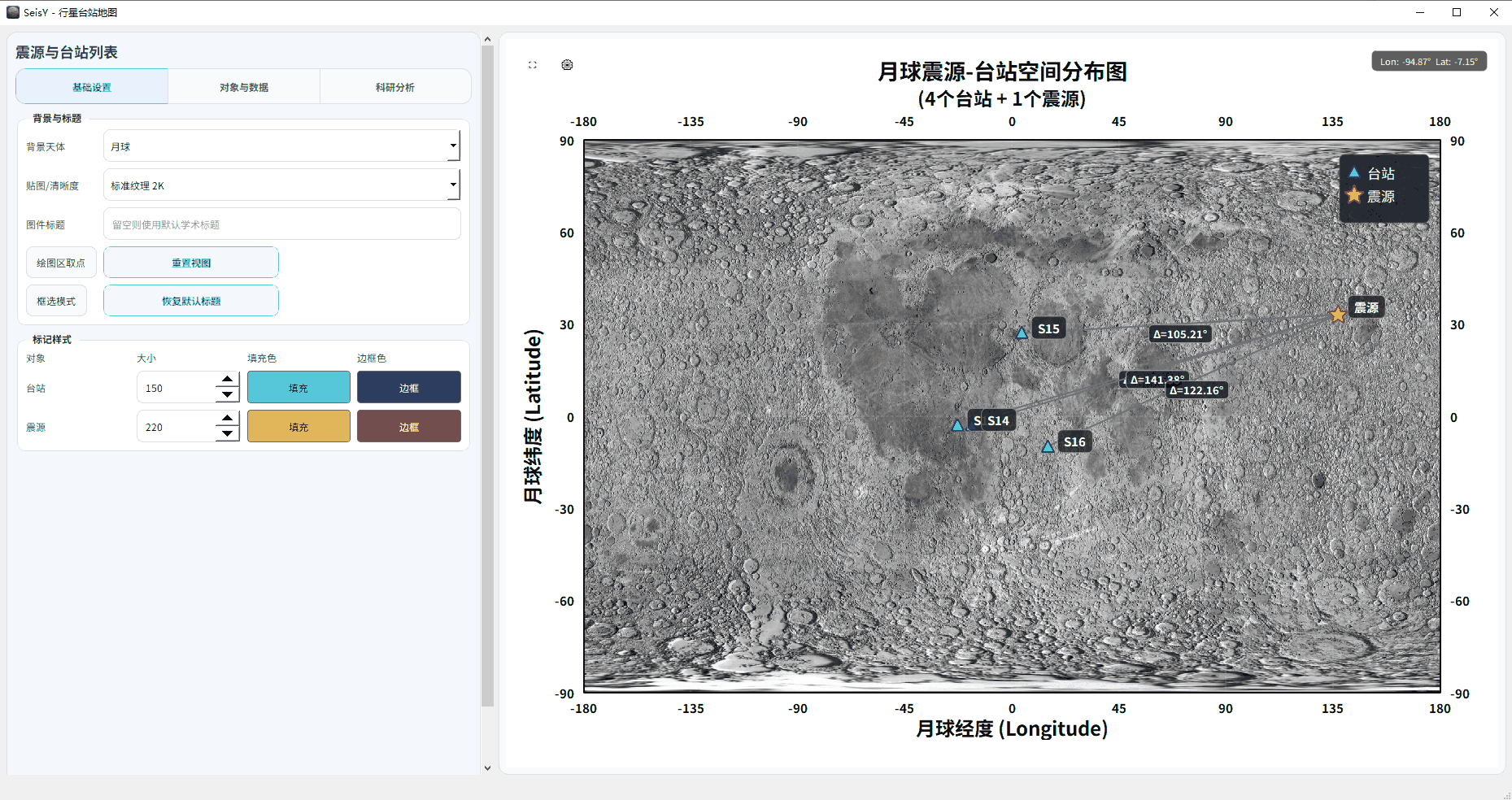
行星台站地图
用于台站 / 震源管理、震中距计算、到时预测与导出。
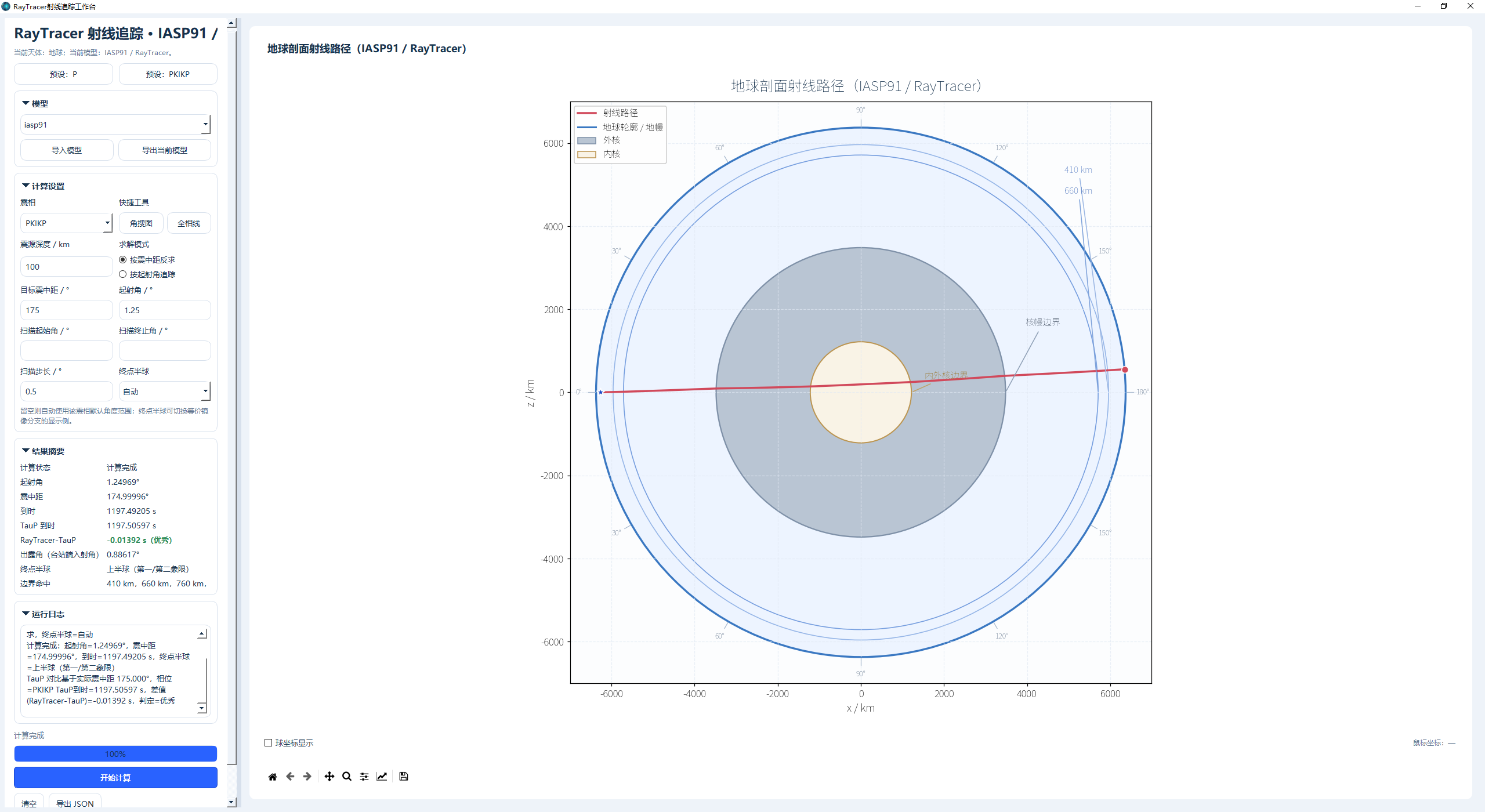
射线追踪工作台
用于射线路径和起射角搜索。
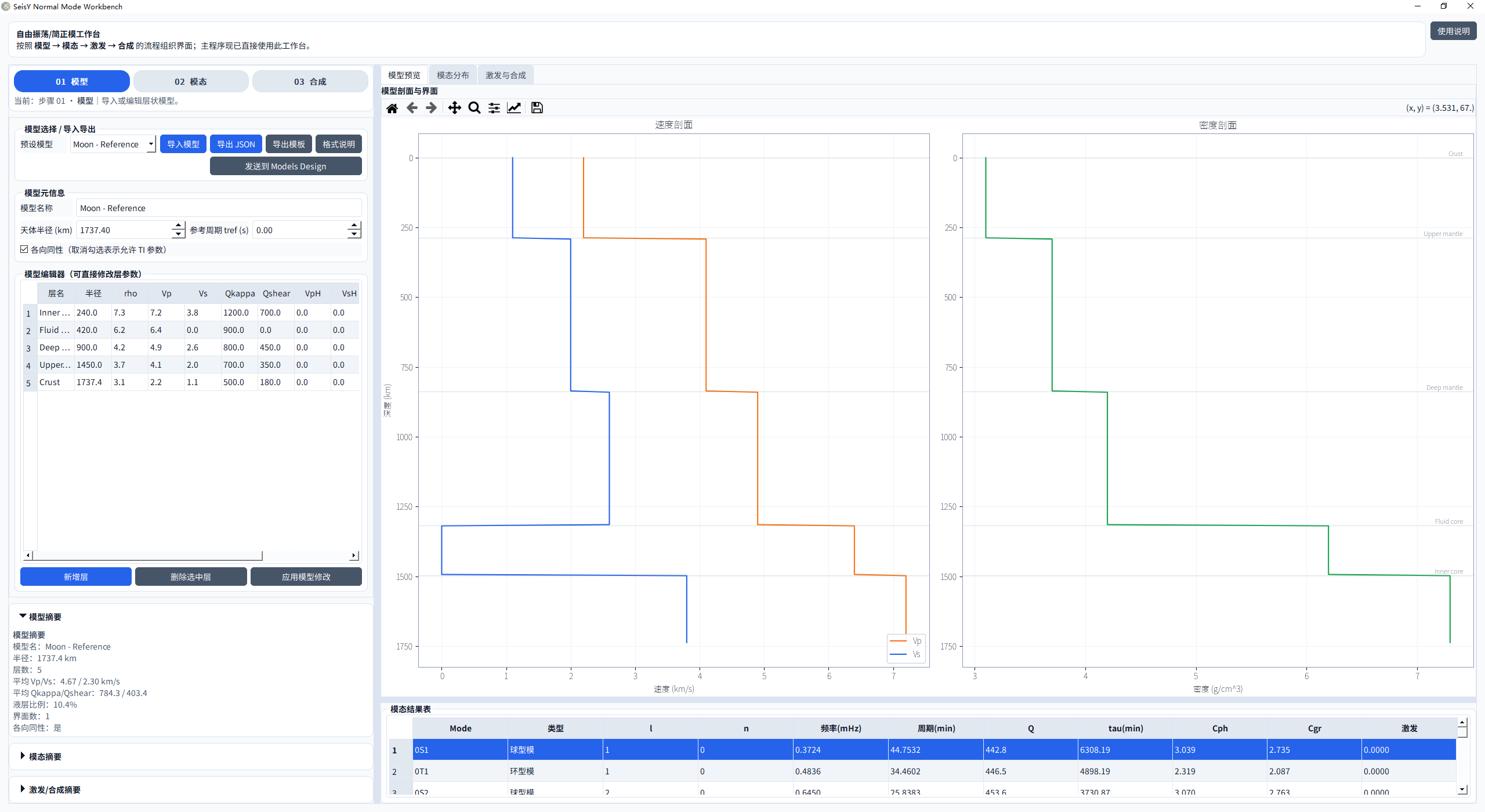
简正模工作台
执行简正模计算、模态分析、观测谱对照与合成。
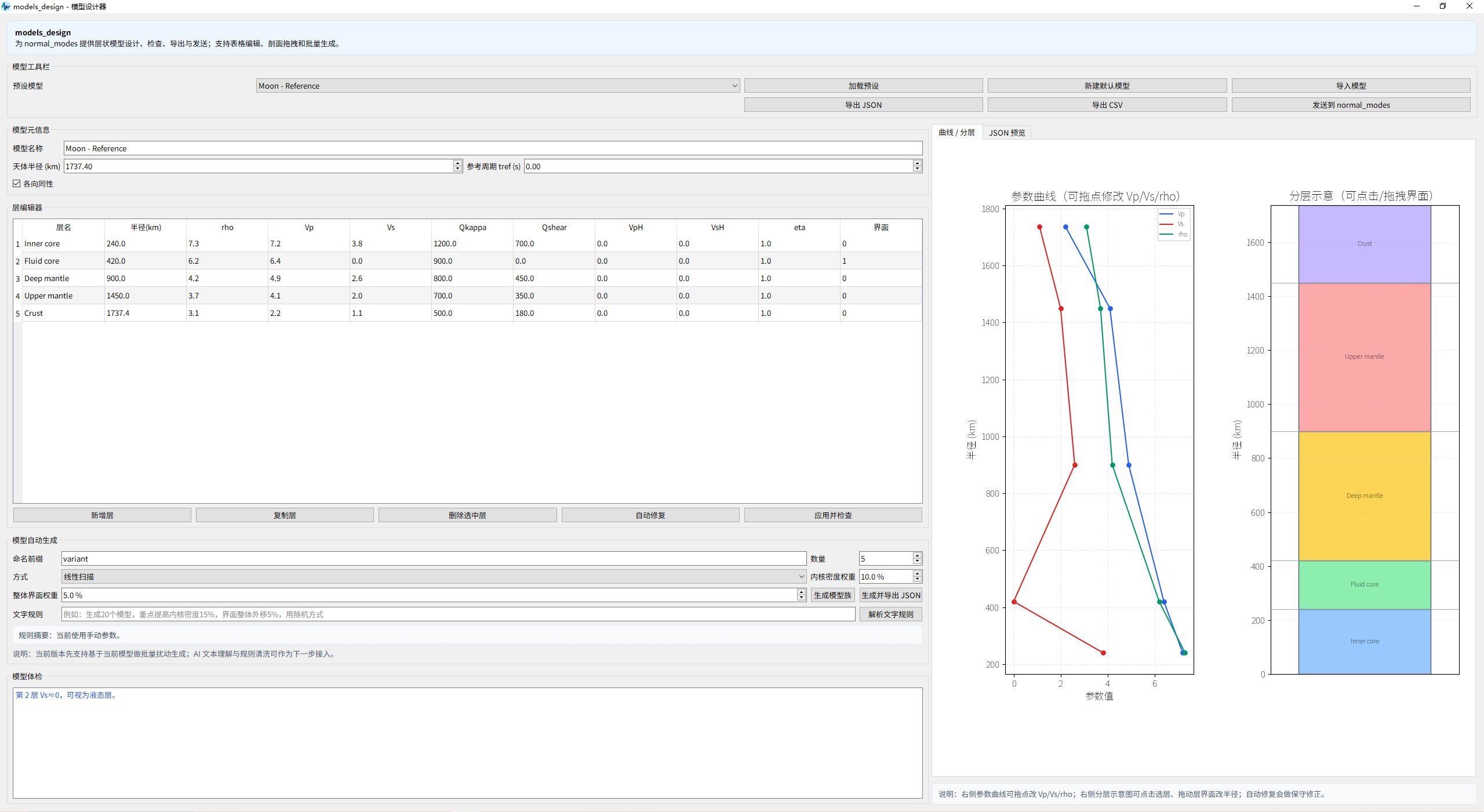
模型设计器
1D / 准 1D 模型设计器,是简正模模块的上游工具。
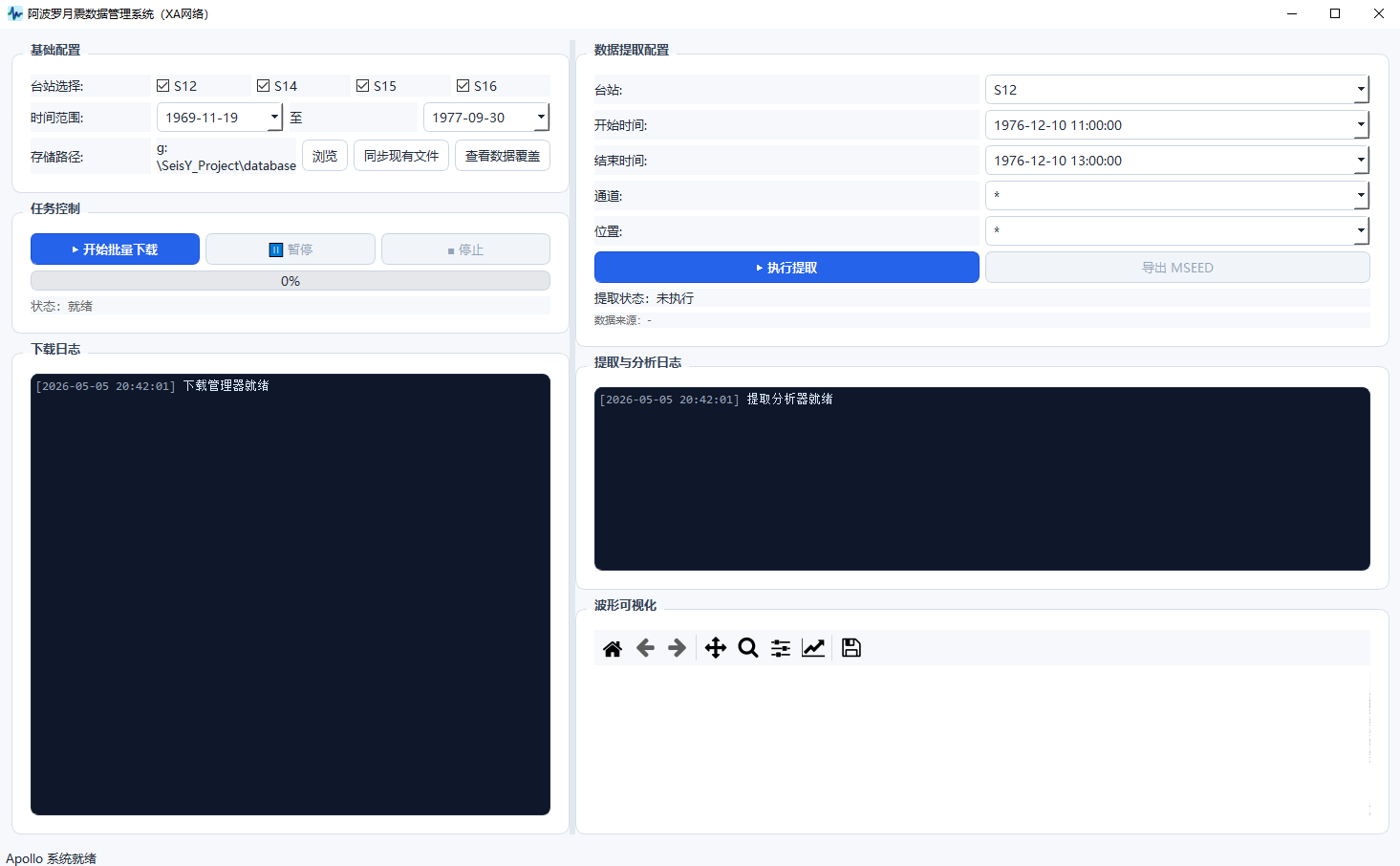
Apollo 系统
用于 Apollo 月震数据的批量下载、提取与可视化。
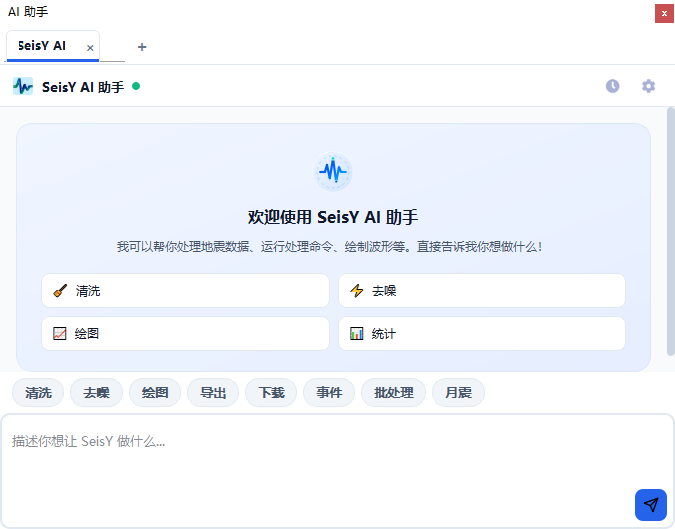
AI 助手
多轮对话科研助手,可执行命令、管理历史并给出上下文推荐。
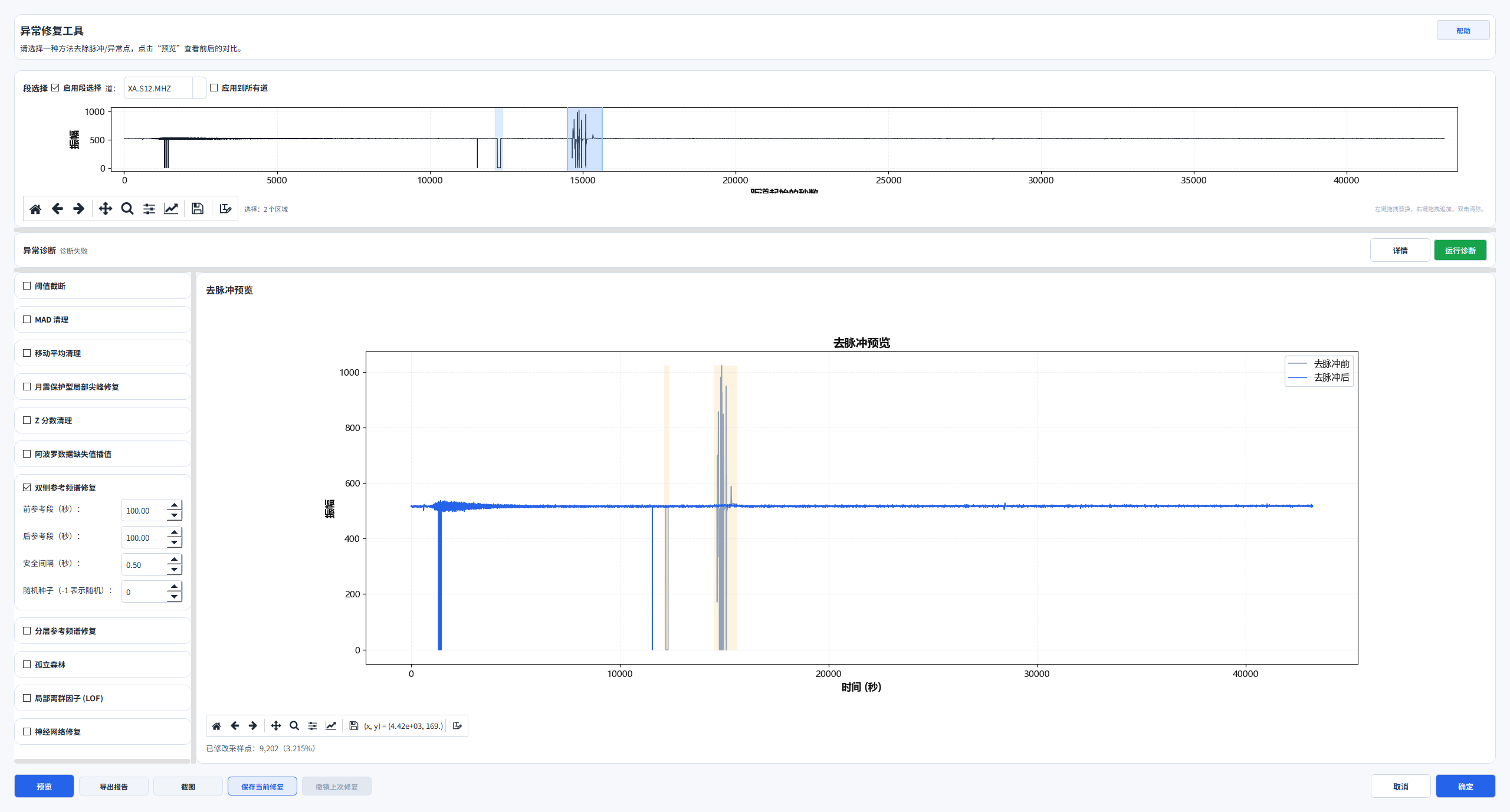
异常修复引擎
异常段检测、频谱替换修复、缺失值插值与修复报告。
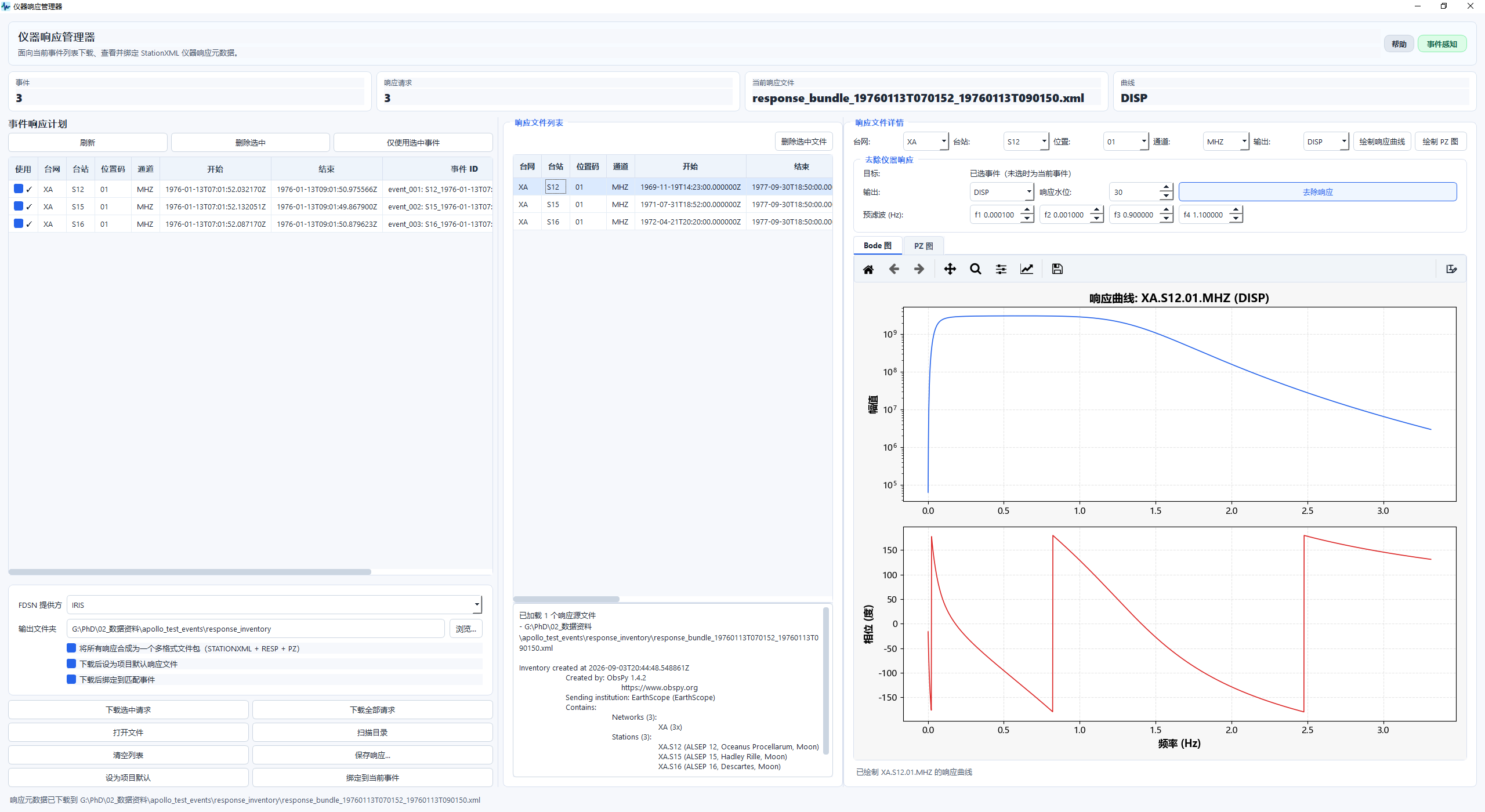
仪器响应管理器
FDSN 响应下载、Inventory 查看、幅频 / 相位曲线与去响应。
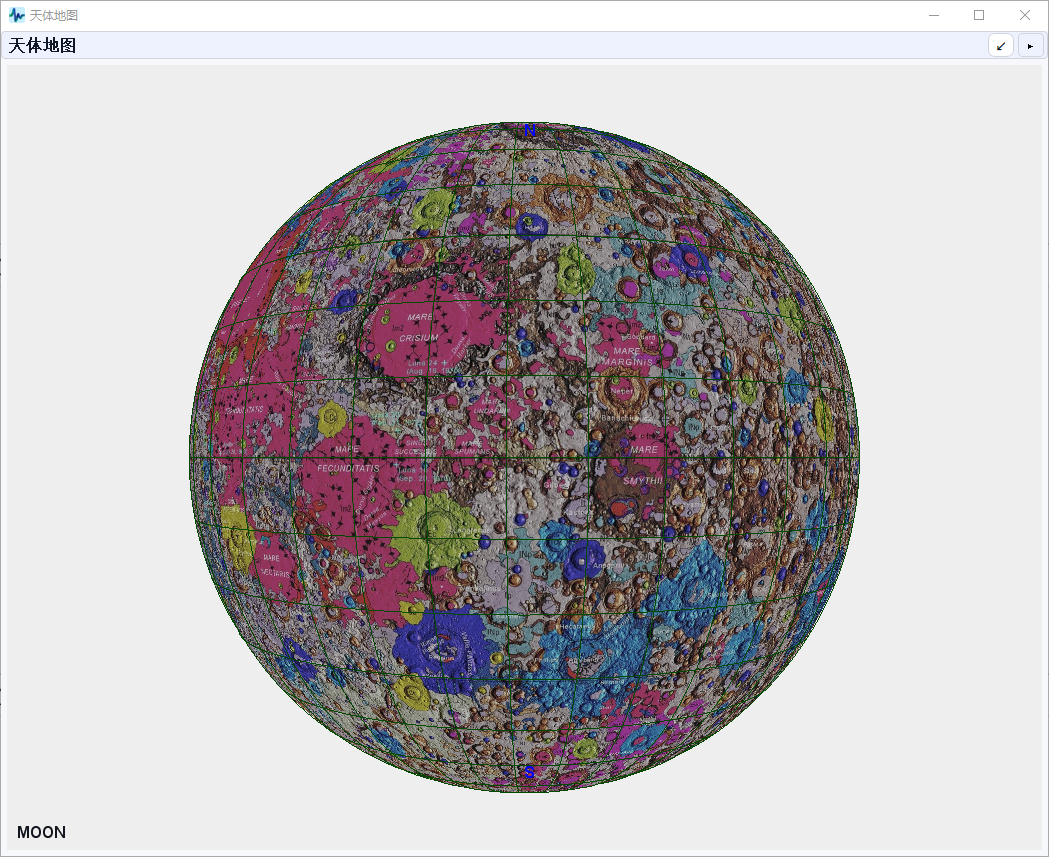
3D 月球地质图
OpenGL 球面渲染 + USGS 月球统一地质图 GIS 叠加。
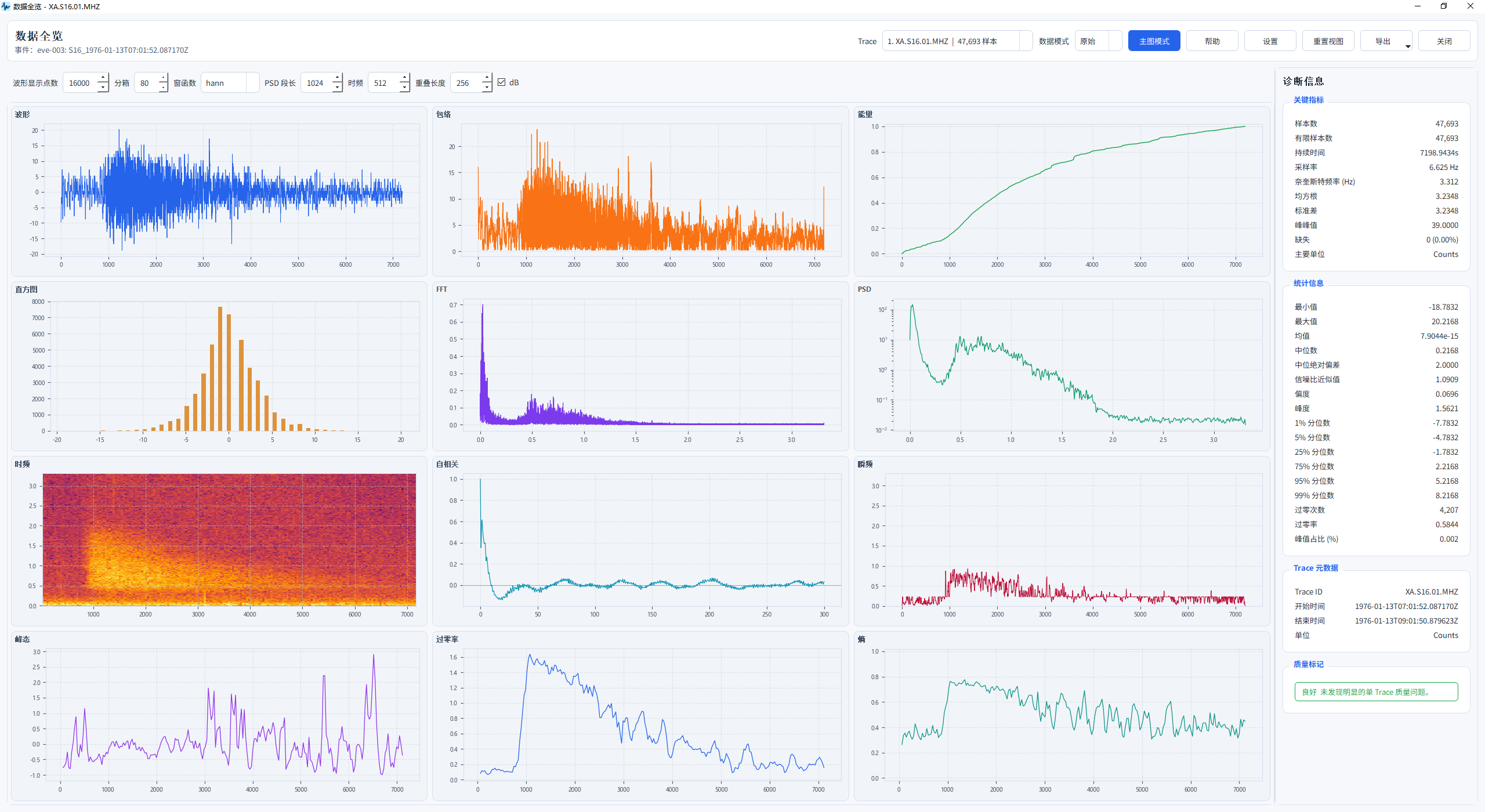
数据全览面板
事件波形、频谱与统计信息的多维度异步预览。
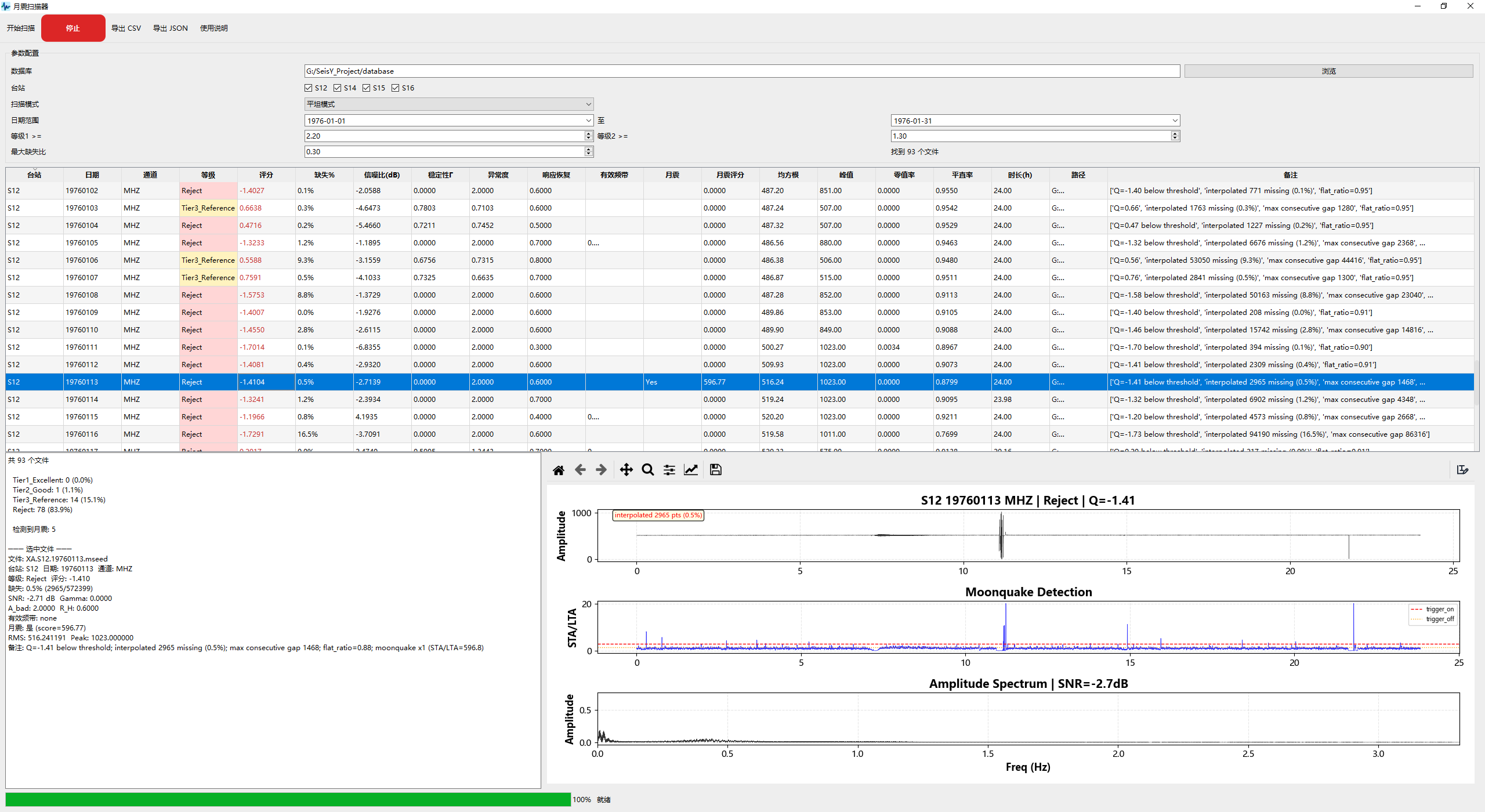
月震扫描器
平坦 / 尖峰 / 全模式批量筛查,输出 SNR 与稳定性评分。
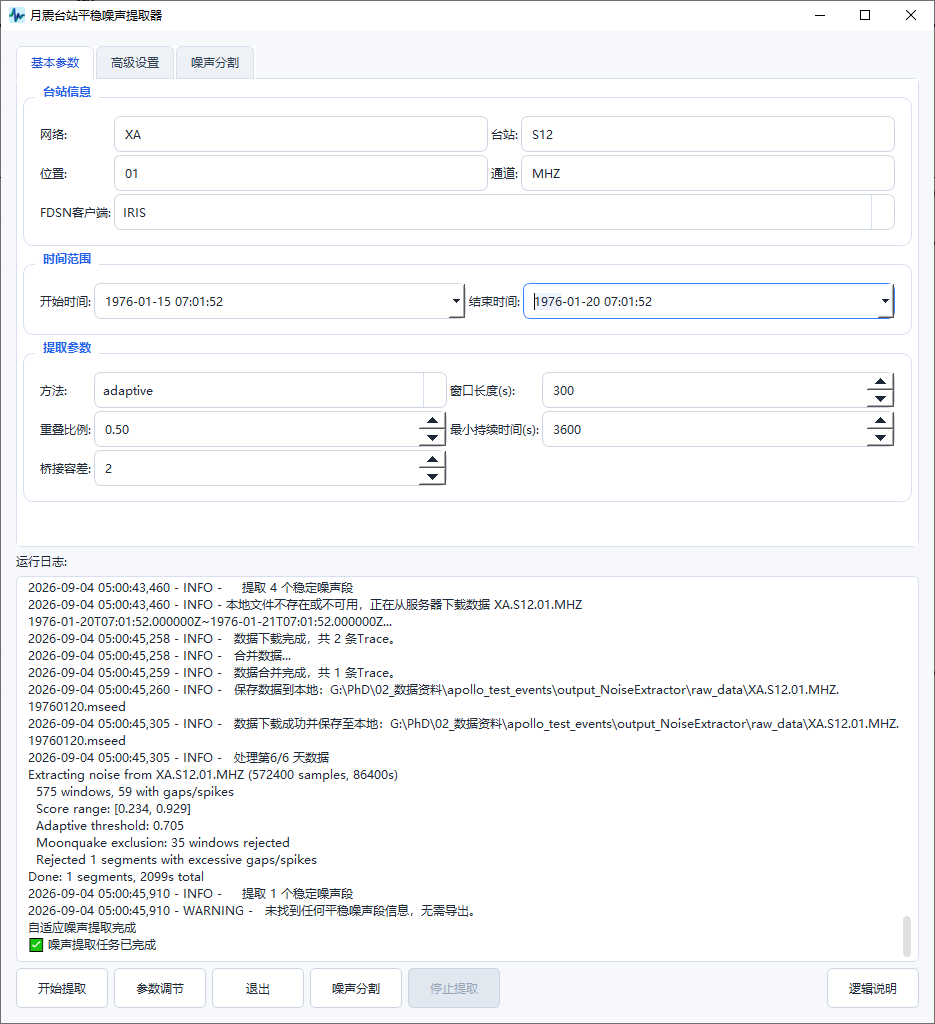
噪声提取器
自动噪声提取,含月震规避与滑动窗口稳定性评估。
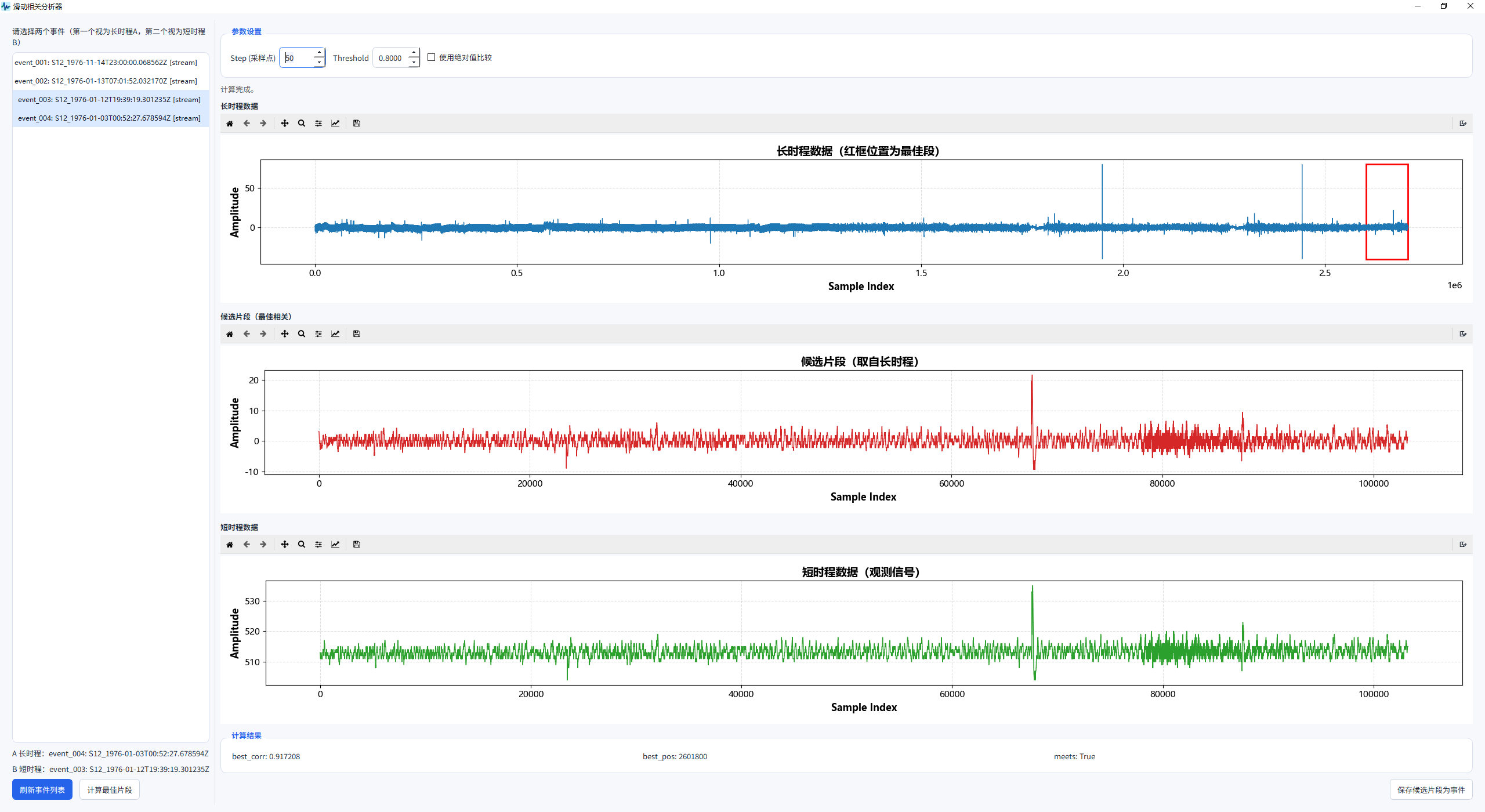
滑动相关分析器
长时程与短时程波形的滑动相关分析,Step / Threshold 参数控制,自动定位最佳匹配片段并支持保存为事件。
专业工具面板与使用
以下按软件实际界面整理每个专业工具的面板分区与推荐使用步骤,帮助快速上手。
射线追踪工作台
面板构成:模型区(导入 / 导出速度模型、预设 P / PKIKP 等震相)、计算设置区(震源深度、目标震中距、求解模式)、快捷工具区(角搜图、全相线、TauP 对比)、结果摘要与运行日志。
使用步骤:① 导入或选择分层速度模型 → ② 选择求解模式(按震中距反求起射角 / 按起射角正演追踪)→ ③ 设定震源深度与目标距离 → ④ 运行并查看射线路径 → ⑤ 需要时导出 JSON 或与 TauP 对比。
简正模工作台
面板构成:模型区(选择 / 导入导出模型)、层编辑器(层名、半径、rho、Vp、Vs、Qkappa、Qshear、VpH、VsH)、求解设置区(球型 S / 环型 T / 径向 R 模态、快速近似 / 均匀球根、计算)、模态结果表(Mode、l、n、频率、周期、Q、tau、Cph、Cgr、激发)。
使用步骤:① 选择或编辑行星模型 → ② 选择模态类型(S / T / R)与求解方式 → ③ 点击计算得到模态频率与 Q → ④ 查看模态结果表并筛选感兴趣模态 → ⑤ 进入激发与合成(可结合观测谱对照)。
模型设计器
面板构成:模型工具栏、层编辑器(表格编辑分层参数)、曲线 / 分层可视化、批量生成区(线性扫描、随机采样、内核密度权重)、文字规则、模型体检(自动修复)。
使用步骤:① 新建或导入模型 → ② 用表格或拖拽编辑层参数 → ③ 需要时用批量生成构造参数族 → ④ 运行模型体检,自动修复不合理层 → ⑤ 导出模型并发送到简正模工作台。
震源定位器
面板构成:台站元数据表、波形拾取区、行星速度模型区、初始震源猜测、反演结果区、地图联动区。
使用步骤:① 导入或选择台站与波形 → ② 拾取 P / S 到时 → ③ 选择行星速度模型并设置初始猜测 → ④ 运行加权最小二乘反演 → ⑤ 查看 RMS 残差与协方差近似,地图上核对震源位置。
行星台站地图
面板构成:基础设置、对象与数据、科研分析三个标签页,以及月球 / 行星台站分布图。
使用步骤:① 导入台站与震源数据 → ② 在基础设置中配置显示 → ③ 计算震中距与到时预测 → ④ 可联动射线追踪与简正模分析 → ⑤ 导出 CSV 或图像。
AI 助手
面板构成:多轮对话区、多标签页、历史记录区、基于当前数据上下文的推荐命令卡片。
使用步骤:① 打开 AI 助手 → ② 用自然语言描述想做的处理(如"对当前事件做带通滤波")→ ③ 参考推荐命令卡片或直接执行 → ④ 在对话中持续追问 / 调整 → ⑤ 必要时开启新标签页并行任务。
异常修复引擎
面板构成:检测参数区(AdvancedDePulse 滑动峰态检测、分层参考谱、月震保护尖峰检测)、缺失值插值选项、修复报告(多选区放大、修复前后频谱对比)。
使用步骤:① 选择待修复事件与检测方法 → ② 设置参考谱与保护参数(避免误伤真实月震尖峰)→ ③ 运行检测与修复 → ④ 查看修复报告,对比修复前后波形与频谱 → ⑤ 必要时调整参数重新修复。
仪器响应管理器
面板构成:响应文件列表、响应详情(Inventory 摘要)、幅频 / 相位响应双曲线、事件感知下载计划、事件级响应绑定、去响应设置(水位、预滤波)。
使用步骤:① 从 FDSN(IRIS / USGS / GFZ / RESIF / EMSC)下载 StationXML → ② 查看响应曲线确认频带特性 → ③ 为事件绑定响应(事件级 → 项目级 → 在线 IRIS fallback)→ ④ 执行去响应并选择水位与预滤波。
噪声提取器
面板构成:台站信息、时间范围、提取参数、月震规避(前 30 分钟 ~ 后 3.5 小时)、输出选项(自适应多特征阈值 adaptive / legacy、合并 OR + NS + MG、噪声分割)。
使用步骤:① 选择台站与时间范围 → ② 设置月震规避窗口 → ③ 选择阈值方法(推荐 adaptive)→ ④ 运行提取并查看滑动窗口稳定性 → ⑤ 导出噪声段。
月震扫描器
面板构成:台站 / 日期 / 通道选择、扫描模式(平坦 / 尖峰 / 全模式)、评分指标区(评分、缺失 %、信噪比、稳定性 Γ、异常度、响应恢复、有效频带)、导出 CSV。
使用步骤:① 选择扫描范围与模式 → ② 运行批量筛查 → ③ 按评分与稳定性筛选候选月震 → ④ 导出 CSV 供后续分析。
月震工作流
面板构成:下载 → 拾取 → 定位 → 分析一体化流程;含频谱收缩基线法、动态后端、恢复前后 SNR 对比、5 统计特征(RMS、LowBand、Kurtosis、Flatness、Crest)与后验概率分类。
使用步骤:① 下载 Apollo 月震数据 → ② 拾取到时 → ③ 执行反演定位 → ④ 用统计特征与后验概率对事件分类 → ⑤ 输出分析结果。
3D 月球地质图
面板构成:OpenGL 月球球体渲染、USGS 月球统一地质图 GIS 数据叠加(地质单元、接触线、线性特征)、透明度控制、与 2D 行星台站地图联动。
使用步骤:① 打开 3D 月球地质图 → ② 叠加 USGS 地质图层 → ③ 旋转球体查看地质分布 → ④ 结合台站 / 震源位置分析区域构造背景。
数据全览面板
面板构成:事件数据的 12 张预览卡(波形、频谱、统计信息等),异步渲染,无需阻塞主界面。
使用步骤:① 选中事件后打开数据全览 → ② 快速浏览各维度预览卡 → ③ 点击进入对应详细工具。
项目文件结构
项目格式为 .seisyproj,由旧手册与当前代码结构共同确认。
manifest.json
- app / version
- saved_at
- operation_count
- dataset_events
state.pkl
- global_config
- seismic_config
- dataset
- undo / operation_history
- current_event_id / selected_event_ids
- 界面与状态快照
事件列表
事件列表是 SeisY 中最关键的数据对象管理工作区之一。
常见分组
- 数据流
- 相关性数据
- 噪声数据
- 阵列数据
- 自定义分组
常用右键能力
- 分组事件
- 计算 / 更多 子菜单
- 复制事件ID / 复制事件 / 粘贴事件
- 删除事件 / 撤销事件 / 重做事件
推荐流程
以下流程用于帮助首次使用者快速建立处理思路。
常规数据处理
- 使用“导入文件”导入波形数据。
- 在事件列表中选中目标事件。
- 依次执行去均值、去趋势、滤波和去除仪器响应。
- 使用绘制当前数据流查看波形。
- 使用“绘制振幅谱”查看频谱。
- 使用“保存数据”或“保存项目”保存结果。
行星地震模拟
- 先用模型设计器设计模型。
- 发送到简正模工作台。
- 计算模态并查看结果。
- 使用行星台站地图配置台站与震源。
- 必要时使用射线追踪工作台分析传播路径。
科学计算与公式索引
本节把 SeisY 中涉及科学计算的核心模块按“代码入口 → 计算逻辑 → 关键公式 → 结果含义”组织起来,便于展示、检索与查阅。
检索与目录
支持按模块名、公式术语、中英文别名与代码关键词实时过滤。0. 科学计算总览与代码索引
SeisY 当前最具方法代表性的模块包括 数据预处理与频谱分析、Hypocenter Locator、RayTracer 和 Normal Mode Workbench。其中 seisy/core/normal_modes.py 已形成“模型 → 模态 → 激发 → 合成 → 观测匹配”的完整链条。
- 频谱 / PSD:
seisy/core/processing.py、seisy/tools/spectrum_analysis.py、seisy/tools/power_spectrum.py - 震源定位:
seisy/core/hypocenter_locator.py - 射线追踪:
seisy/core/raytracer.py - 简正模:
seisy/core/normal_modes.py - 月震流程 / PDDM / SWI / 合成记录:
seisy/core/lunar_pipeline.py、seisy/core/PDDM.py、seisy/core/SWI.py、seisy/core/SeismicSynthesizer.py
1. 数据预处理 / 频谱 / PSD
对应代码:seisy/core/processing.py、seisy/tools/spectrum_analysis.py、seisy/tools/power_spectrum.py
- 异常值稳定化:先处理
NaN / +Inf / -Inf,保证归一化、滤波与 FFT 输入有限。 - Min-Max 归一化:\( x'=(x-x_{\min})/(x_{\max}-x_{\min}) \);若 \( x_{\max}=x_{\min} \),则该道置零。
- 离散傅里叶变换:\( X[k]=\sum_{n=0}^{N-1} x[n]e^{-i2\pi kn/N} \);频率轴为 \( f_k = kf_s/N \)。
- 双边谱与功率谱密度:\( A_2(f)=|X(f)|/N \),\( PSD_2(f)=|X(f)|^2/(f_sN) \)。
- Welch 平均:分段、加窗、逐段 FFT 后平均,以降低方差并改善 PSD 稳定性。
- Parseval 背景:时域平方和与频域平方和对应,因此 PSD 比单纯振幅谱更适合解释能量分布。
- SNR:既支持功率型 \( 10\log_{10}(P_s/P_n) \),也支持 RMS 比值型定义。
2. hypocenter_locator.py:球面几何、走时与加权最小二乘
对应代码:seisy/core/hypocenter_locator.py
- 大圆距离:先用 Haversine 计算台站与震源的中心角 \( \Delta \),再转换为震中距。
- 理论走时:优先调用 TauP;回退近似时采用 \( L_{arc}=R\Delta \)、\( L=\sqrt{L_{arc}^2+h^2} \)、\( t=L/v \)。
- 反演参数:\( m=(lat,lon,depth,t_0) \)。
- 残差函数:\( r_i=w_i\,[t_{obs}-(t_0+t_{calc}+c_i)] \),其中
w_i为综合权重,c_i为台站改正。 - 不确定性近似:输出 RMS 残差,并以 \( (J^\mathsf{T}J)^{-1} \) 作为协方差近似。
3. raytracer.py:分层速度模型、路径积分与目标震中距反求
对应代码:seisy/core/raytracer.py
- 层内速度模型:常写成 \( v(r)=a+bx+cx^2+dx^3,\ x=r/R \) 的半径归一化多项式。
- 正演模式:给定起射角,逐层推进并累计走时、震中距、出射角与路径点。
- 反求模式:扫描并细化起射角,使理论震中距逼近目标值。
- 连续介质表达:物理背景可写成 \( T=\int ds/v(r) \);射线参数常写作 \( p\sim r\sin i / v(r) \)。
4. normal_modes.py I:模型准备、模态枚举、频率估计、Q 与阻尼
对应代码:seisy/core/normal_modes.py
- 模型对象:
PlanetaryModel维护半径、密度、Vp、Vs、qkappa、qshear等分层参数。 - 模态枚举:按角阶数
l、径向阶数n与模态类型(spheroidal / toroidal / radial)生成候选模态。 - Toroidal 频率:近似满足 \( f \propto V_s\sqrt{l(l+1)}/(2\pi R) \)。
- Spheroidal 频率:近似满足 \( f \propto V_{eff}\sqrt{l(l+1)}/(2\pi R) \)。
- Radial 频率:近似满足 \( f \propto V_p/R \)。
- Q 与阻尼时间:先由
qkappa、qshear合成模态 Q,再用 \( \tau = Q/(\pi f) \) 转成阻尼时间。
5. normal_modes.py II:特征函数、震源激发与台站响应合成
- 特征函数:在归一化半径 \( x=r/R \) 上构造振型;Toroidal 近似可写作 \( x^l\sin((n+1)\pi x) \)。
- 密度缩放:振型再乘 \( \sqrt{\rho(r)} \),用于体现能量权重趋势。
- 有限震源时窗:代码采用高斯型抑制项 \( \exp(-(2\pi fT)^2/8) \)。
- 台站响应合成:按阻尼振荡叠加 \( u(t)=\sum_m W_m e^{-t/\tau_m}\sin(2\pi f_m t+\phi_m) \)。
6. normal_modes.py III:观测谱峰检测、理论匹配与精确球贝塞尔求根
- 峰值检测:基于
scipy.signal.find_peaks(),结合背景分位数与动态显著性阈值。 - 自适应容差:匹配容差由理论模态局部频率间距与观测峰频共同决定,而非固定常数。
- 精确求解器:
ExactNormalModeSolver用球贝塞尔边界条件求根,例如 Toroidal 满足 \( j_l'(x)+j_l(x)/x=0 \)。 - 根到频率:若根为 \( x_n \),则频率按 \( f=vx_n/(2\pi R) \) 换算,并用
brentq搜索。 - 求解原理分层:当前代码实际包含两套思路:
NormalModeCalculator做半经验频率估算;ExactNormalModeSolver做均匀球边界条件求根。 - 近似求解并不严格:
_estimate_frequency()更接近 \( f \sim \frac{v_{eff}}{2\pi R}\times \text{degree term}\times \text{radial factor}\times \text{structure factor} \) 这样的经验估计,而不是完整弹性球本征值方程求解。 - 均匀球根求解的起点:若取均匀球近似,则径向解可写成 \( u(r)\propto j_l(kr) \),其中 \( k=\omega/v \),并令 \( x=kR=\omega R/v \)。
- 当前代码中的边界条件:Toroidal 为 \( j_l'(x)+j_l(x)/x=0 \);Radial 为 \( j_0'(x)=0 \);当前简化的 Spheroidal 为 \( j_l'(x)+2j_l(x)/x=0 \)。
- 根到频率的严格映射:由 \( x_n=\omega_n R/v \) 与 \( \omega_n=2\pi f_n \) 可得 \( f_n=vx_n/(2\pi R) \)。
- 数值求根逻辑:
_find_roots()先扫描自变量区间;若边界函数满足 \( F(x_k)F(x_{k+1})<0 \),说明区间内存在根,再调用brentq求解 \( F(x_n)=0 \)。
7. 月震流程 / PDDM / SWI / 合成地震记录
- 月震流程:默认质量筛选使用 \( \mathrm{SNR}=\mathrm{RMS}(signal)/\mathrm{RMS}(noise) \);叠加重建采用 \( \bar{x}(t)=\frac{1}{N}\sum_i x_i(t) \)。
- PDDM:在频域中使用 \( F_{re}=(F_{s2s1}-F_{s2n1})/(F_{s2}^{*}+\varepsilon) \) 进行反卷积式恢复。
- SWI:当前是“前向频散 + 加权失配 + 平滑约束 + L-BFGS-B 优化”的反演骨架。
- 合成记录:Ricker 子波采用 \( w(t)=(1-2\pi^2f_0^2t^2)e^{-\pi^2f_0^2t^2} \),并显式检查 Nyquist 条件。
文档依据
本页内容依据 SeisY 软件官方手册、当前程序实现与界面翻译资源整理而成,供使用者快速了解软件各模块功能与操作方式。
SeisY Planetary Seismology Integrated Analysis Platform
A toolkit for data processing, analysis, and simulation in seismology, moonquake studies, and planetary seismology.
Main window: resource manager and globe on the left, three plot panels in the center, terminal and event list on the right.Overview
SeisY is an integrated platform for seismic, moonquake, and planetary seismology data processing and simulation analysis.
Core data operations
Import 8 data formats (MiniSEED, SAC, SEG-Y, SEG2, ASCII, TXT, CSV, and auto-detect), browse working directories, save and reopen projects, manage file trees, and monitor logs with an embedded terminal.
Waveform and spectrum processing
Over 20 processing operations including De-mean, Detrend, response removal, 10 interpolation methods, 6 window functions, bandpass/median filtering, normalization, de-pulse, spectral analysis, sliding correlation, and multi-event comparison.
Planetary seismology workflow
Integrates Hypocenter Locator, Planetary Station Map, RayTracer, Normal Mode Workbench, Models Design, Moonquake Workflow, PDDM denoising, Noise Extractor, and Apollo System.
Main layout
All explanatory text is fully switched to English in this mode, while keeping menu names consistent with the software.
Left resource manager
- Browse the working directory and file tree
- Supports sorting, context menus, and multi-selection
- Used for importing data and opening scripts or config files
- Connected to the globe / map area below
Map / globe area
- OpenGL-based planetary visualization area
- Displays Earth, Moon, Mars, and other bodies
- Works with stations, sources, paths, and textures
- Useful for geometric interpretation in planetary seismology
Three central plot panels
canvas_topcanvas_midcanvas_bottom- Used for waveforms, spectra, comparisons, and before/after processing display
Right terminal and event list
- Top right: log output and embedded command terminal
- Bottom left: event list
- Bottom right: event details and auxiliary display area
- Status bar shows path, selection count, event count, and version
Plot area
Event list area
Toolbar
The toolbar places high-frequency actions directly in the main window for faster operation. The main toolbar sits at the top; a secondary toolbar appears in the event list area.
Main Toolbar (5 groups, 38 buttons + theme / language switchers)
Group 1 · File
- Import: import waveform data files
- Open: open a file in the editor
- Open Folder: browse the working directory (Ctrl+K)
- Save: save current data (Ctrl+S)
Group 2 · Edit
- Undo / Redo: operation history (Ctrl+Z / Ctrl+Y)
- Find: search functionality (Ctrl+F)
- View: switch display modes and layouts
- Fullscreen: toggle fullscreen mode (F11)
- Log: show runtime log
Group 3 · Process
- Apollo missing-value interpolation: interpolate missing values on Apollo data
- Filtering: bandpass / lowpass filtering
- De-pulse: spike removal with plotting
- De-mean: remove DC offset
- Spline Detrend: spline baseline removal
- Plot Spectrum: plot amplitude spectrum
- Plot Time-Domain and Amplitude Spectrum: combined time-frequency display
- Export Spectrum: export spectrum data to file
- Data Viewer: inspect trace headers and details
- Data Overview: multi-dimensional event overview
- ATT Timing Correction: absolute timing travel-time correction
Group 4 · Data
- Modify Configurations: edit software parameters
- Download Seismic Data: download waveforms via FDSN
- Trace Display Filter: set trace display filter conditions
- STA/LTA: classic STA/LTA phase picker
Group 5 · Tools
- AI Assistant: research AI dialogue assistant
- SeisRT: online real-time seismic tool
- Apollo System: Apollo moonquake data management
- Hypocenter Locator: source inversion location window
- Planetary Station Map: station and source visualization
- RayTracer: ray-path and travel-time analysis
- Moonquake Workflow: multi-step moonquake inversion pipeline
- Instrument Response Manager: response download and removal
- Normal Mode Workbench: free-oscillation and normal-mode analysis
- Noise Extractor: automated seismic noise extraction (Ctrl+N)
Bottom Toolbar (Event List Area)
Event Correlation Analysis
- Cross Correlation: cross-correlation between two events
- Auto Correlation: autocorrelation of a single event
Tool matrix
A condensed view of the most distinctive tools under Tools and Simulation.
Hypocenter Locator
Integrated location window for stations, waveforms, picks, models, results, and maps.
Planetary Station Map
Station/source management, epicentral distance calculation, travel-time prediction, and export.
RayTracer
Workbench for ray-path and takeoff-angle search.
Normal Mode Workbench
Normal-mode computation, modal analysis, observed spectrum comparison, and synthesis.
Models Design
1D / quasi-1D model designer used upstream of normal-mode analysis.
Apollo System
Batch download, extraction, and visualization of Apollo moonquake data.
AI Assistant
Multi-turn dialogue research assistant with command execution and context-aware suggestions.
Anomaly Repair Engine
Anomaly detection, spectrum-based repair, missing-value interpolation, and repair reports.
Instrument Response Manager
FDSN response download, inventory inspection, amplitude/phase curves, and de-response.
3D Lunar Geology Map
OpenGL lunar sphere rendering with USGS unified lunar geology GIS overlay.
Data Overview Panel
Multi-dimensional asynchronous preview of event waveforms, spectra, and statistics.
Moonquake Scanner
Flat/spike/full batch scanning with SNR and stability scoring.
Noise Extractor
Automated noise extraction with moonquake avoidance and stability assessment.
Sliding Correlation Analyzer
Sliding correlation between long and short windows with Step/Threshold control; locates the best-matching segment and can save it as an event.
Tool Panels & Usage
Panel layout and recommended usage steps for each professional tool, based on the actual software UI.
RayTracer
Panels: model area (import/export velocity model, preset P/PKIKP phases), computation settings (source depth, target epicentral distance, solving mode), shortcut tools (angle-search plot, full-phase lines, TauP comparison), result summary and log.
Steps: ① load/select layered model → ② choose solving mode (invert takeoff angle from distance / forward trace from takeoff angle) → ③ set depth and target distance → ④ run and inspect ray paths → ⑤ export JSON or compare with TauP if needed.
Normal Mode Workbench
Panels: model area, layer editor (name, radius, rho, Vp, Vs, Qkappa, Qshear, VpH, VsH), solver settings (spheroidal S / toroidal T / radial R, fast approximation / uniform-sphere roots), modal result table (Mode, l, n, frequency, period, Q, tau, Cph, Cgr, excitation).
Steps: ① select/edit a planetary model → ② choose mode type (S/T/R) and solver → ③ compute frequencies and Q → ④ filter modes of interest → ⑤ proceed to excitation/synthesis with observed-spectrum matching.
Models Design
Panels: model toolbar, layer editor (tabular editing), curve/layer visualization, batch generation (linear sweep, random sampling, kernel-density weighting), text rules, model check-up (auto repair).
Steps: ① create/import a model → ② edit layer parameters in the table or by dragging → ③ optionally generate parameter families in batch → ④ run check-up and auto-repair → ⑤ export and send to the Normal Mode Workbench.
Hypocenter Locator
Panels: station metadata table, waveform picking area, planetary velocity model area, initial source guess, inversion result area, linked map.
Steps: ① import/select stations and waveforms → ② pick P/S arrivals → ③ choose a planetary model and initial guess → ④ run weighted least-squares inversion → ⑤ inspect RMS residual and covariance approximation, verify the source on the map.
Planetary Station Map
Panels: Basic Settings, Objects & Data, and Research Analysis tabs plus the lunar/planetary station map.
Steps: ① import stations and sources → ② configure display in Basic Settings → ③ compute epicentral distances and predicted arrivals → ④ link to RayTracer / normal-mode analysis → ⑤ export CSV or images.
AI Assistant
Panels: multi-turn dialogue area, multiple tabs, history, and recommended-command cards based on current data context.
Steps: ① open the AI Assistant → ② describe the processing you want in natural language (e.g. "bandpass filter the current event") → ③ use a recommended command card or execute directly → ④ refine in the conversation → ⑤ open new tabs for parallel tasks.
Anomaly Repair Engine
Panels: detection parameters (AdvancedDePulse sliding-kurtosis detection, layered reference spectrum, moonquake-protected spike detection), missing-value interpolation options, repair report (multi-selection zoom, before/after spectra).
Steps: ① choose the event and detection method → ② set reference spectrum and protection parameters → ③ run detection and repair → ④ review the report (waveform and spectrum comparison) → ⑤ re-run with adjusted parameters if needed.
Instrument Response Manager
Panels: response file list, inventory summary, amplitude/phase response curves, event-aware download plan, event-level response binding, de-response settings (water level, pre-filter).
Steps: ① download StationXML from FDSN (IRIS/USGS/GFZ/RESIF/EMSC) → ② inspect response curves → ③ bind responses per event (event → project → online IRIS fallback) → ④ remove response with chosen water level and pre-filter.
Noise Extractor
Panels: station info, time range, extraction parameters, moonquake avoidance (30 min before to 3.5 h after), output options (adaptive multi-feature threshold / legacy, merge OR+NS+MG, noise segmentation).
Steps: ① select station and time range → ② set moonquake avoidance window → ③ choose threshold method (adaptive recommended) → ④ run and check sliding-window stability → ⑤ export noise segments.
Moonquake Scanner
Panels: station/date/channel selection, scan mode (flat/spike/full), scoring (score, missing %, SNR, stability Γ, anomaly, response recovery, effective band), CSV export.
Steps: ① choose scan range and mode → ② run batch screening → ③ filter candidates by score and stability → ④ export CSV for later analysis.
Moonquake Workflow
Panels: integrated download → pick → locate → analyze pipeline; spectrum-shrinkage baseline method, dynamic backend, SNR before/after recovery, five statistical features (RMS, LowBand, Kurtosis, Flatness, Crest) and posterior-probability classification.
Steps: ① download Apollo moonquake data → ② pick arrivals → ③ run inversion/location → ④ classify events by statistical features and posterior probability → ⑤ output results.
3D Lunar Geology Map
Panels: OpenGL lunar sphere, USGS unified lunar geology GIS overlay (units, contacts, linears), transparency control, linked with the 2D planetary station map.
Steps: ① open the 3D map → ② overlay USGS geology layers → ③ rotate to inspect geological distribution → ④ combine station/source positions for tectonic context.
Data Overview Panel
Panels: twelve preview cards (waveform, spectrum, statistics) rendered asynchronously without blocking the main UI.
Steps: ① select an event and open Data Overview → ② quickly browse the preview cards → ③ open the corresponding detailed tool.
Project structure
The .seisyproj structure is summarized from both your draft manual and the current codebase.
manifest.json
- app / version
- saved_at
- operation_count
- dataset_events
state.pkl
- global_config
- seismic_config
- dataset
- undo / operation_history
- current_event_id / selected_event_ids
- UI and state snapshot
Event list
The event list is one of the most important object-management workspaces in SeisY.
Common groups
- Streams
- Correlation Data
- Noise Data
- Array Data
- Custom groups
Typical context-menu actions
- Group Events
- Cal / More submenu
- Copy Event ID / Copy Event / Paste Event
- Delete Event / Undo Event / Redo Event
Recommended workflow
These workflows help first-time users get started quickly.
General data processing
- Use Import File to load waveform data.
- Select the target event in the event list.
- Apply De-mean, Detrend, Filtering, and Remove Response in sequence.
- Use Plot Current Stream to inspect the waveform.
- Use Plot Amplitude Spectrum to inspect the spectrum.
- Save the result with Save Data or Save Project.
Planetary seismology simulation
- Design a model in Models Design.
- Send the model to Normal Mode Workbench.
- Compute modes and review the results.
- Configure stations and sources in Planetary Station Map.
- Use RayTracer if propagation-path analysis is needed.
Scientific Computation Index
This section maps SeisY's main computational modules to formulas, processing logic, code entry points, and searchable notes.
Search and jump
Search works on module names, formulas, aliases, and code-oriented keywords.0. Overview and code map
The strongest methodology-oriented modules in SeisY are FFT / PSD analysis, Hypocenter Locator, RayTracer, and Normal Mode Workbench, especially the model-to-observation loop in seisy/core/normal_modes.py.
1. Processing, FFT, spectra, and PSD
- Per-trace min-max normalization uses \( x'=(x-x_{\min})/(x_{\max}-x_{\min}) \).
- The spectral core is the DFT \( X[k]=\sum_{n=0}^{N-1}x[n]e^{-i2\pi kn/N} \).
- PSD is formed as \( |X(f)|^2/(f_sN) \), with Welch averaging used for variance reduction.
2. Hypocenter location
- Travel times come from TauP when available, with a homogeneous fallback path model.
- The inversion minimizes weighted residuals \( r_i=w_i[t_{obs}-(t_0+t_{calc}+c_i)] \).
- Outputs include RMS residuals and an approximate covariance from \( (J^\mathsf{T}J)^{-1} \).
3. Ray tracing
- Layer velocities are represented by polynomial radial models.
- SeisY supports both fixed-takeoff-angle forward tracing and target-distance inverse search.
- The continuous background can be interpreted as \( T=\int ds/v(r) \).
4. Normal Modes I: models, frequency, Q, damping
- Characteristic frequency estimates follow mode-family-dependent radius and velocity scaling.
- Damping follows \( \tau = Q/(\pi f) \).
5. Normal Modes II: eigenfunctions, excitation, synthesis
- Eigenfunctions are built on normalized radius \( x=r/R \) and density-scaled by \( \sqrt{\rho(r)} \).
- Finite-duration suppression uses \( \exp(-(2\pi fT)^2/8) \).
- Station response is synthesized as \( u(t)=\sum_m W_m e^{-t/\tau_m}\sin(2\pi f_m t+\phi_m) \).
6. Normal Modes III: observed-spectrum matching and exact root solving
- The exact solver uses spherical-Bessel boundary conditions, for example \( j_l'(x)+j_l(x)/x=0 \).
- Roots are converted to frequencies through \( f=vx_n/(2\pi R) \).
7. Lunar pipeline, PDDM, SWI, and synthetic seismograms
- The lunar workflow uses RMS-style SNR \( \mathrm{SNR}=\mathrm{RMS}(signal)/\mathrm{RMS}(noise) \) and aligned stacking \( \bar{x}(t)=N^{-1}\sum_i x_i(t) \).
- PDDM uses frequency-domain recovery \( F_{re}=(F_{s2s1}-F_{s2n1})/(F_{s2}^{*}+\varepsilon) \).
- The synthesizer uses the Ricker wavelet \( w(t)=(1-2\pi^2f_0^2t^2)e^{-\pi^2f_0^2t^2} \).
References
This page is compiled from the SeisY official manual, the current program implementation, and its interface translation resources, to help users quickly understand each module's features and how to use them.